 SweepBoardby TRM
Every area swept. Every second recorded.
When the alarm sounds, SweepBoard alerts your fire wardens, shows the incident controller each area turning green as it is checked, and writes a time-stamped evacuation record without anyone touching a clipboard.
Works on the phones your team already carry. No app store. No hardware. No warden passwords: just your site code.
At the assembly point, nobody can prove the building is empty
The alarm is sounding. People are outside. The fire service will arrive in minutes and ask one question: is everyone out? In most buildings the honest answer is "we think so".
The controller is blind
Wardens sweep out of sight. The person in charge waits for people to walk back and report, with no idea which areas are still unchecked.
Minutes disappear
Verbal reports, radios and runners take time. An unchecked stockroom or toilet block is only discovered when someone thinks to ask.
The record is an afterthought
Drill sheets are filled in afterwards from memory. Times are estimated. Issues found on the day are lost by the next morning.
Watch a full evacuation in 90 seconds
The real app on an example site: the same simple routine for a drill or a real evacuation.
- Raise itThe controller taps Start evacuation or Start drill. The clock starts.
- AlertEvery warden’s phone gets an alert that opens straight onto their floor.
- SweepWardens tap each area clear, scan a checkpoint label where you choose, or log an issue.
- ConfirmRefuges and roll call are confirmed. The all-clear time is stamped.
- Stand downOne tap closes the incident and saves the full report.
Know what is clear, what is not, and who is checking it
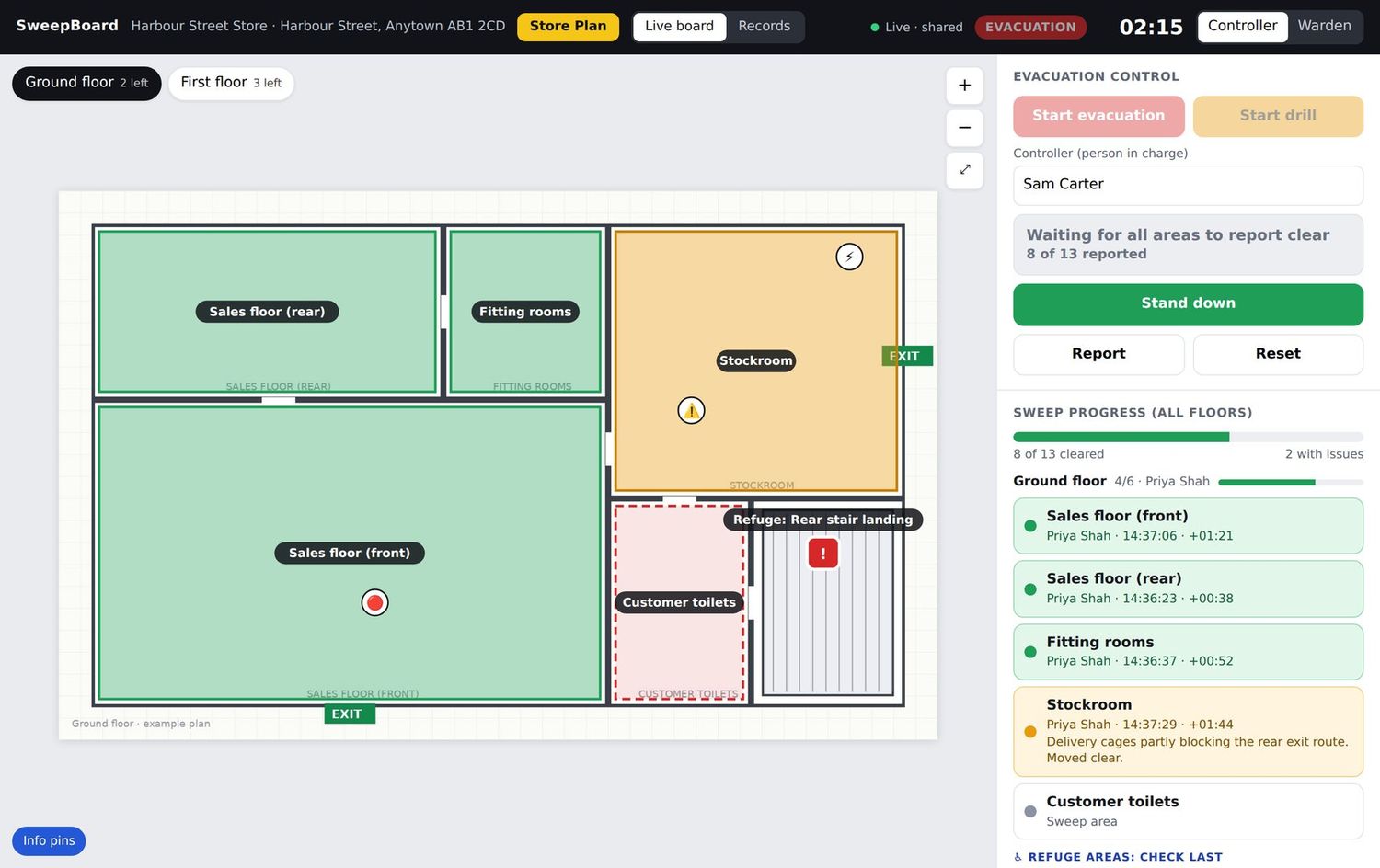
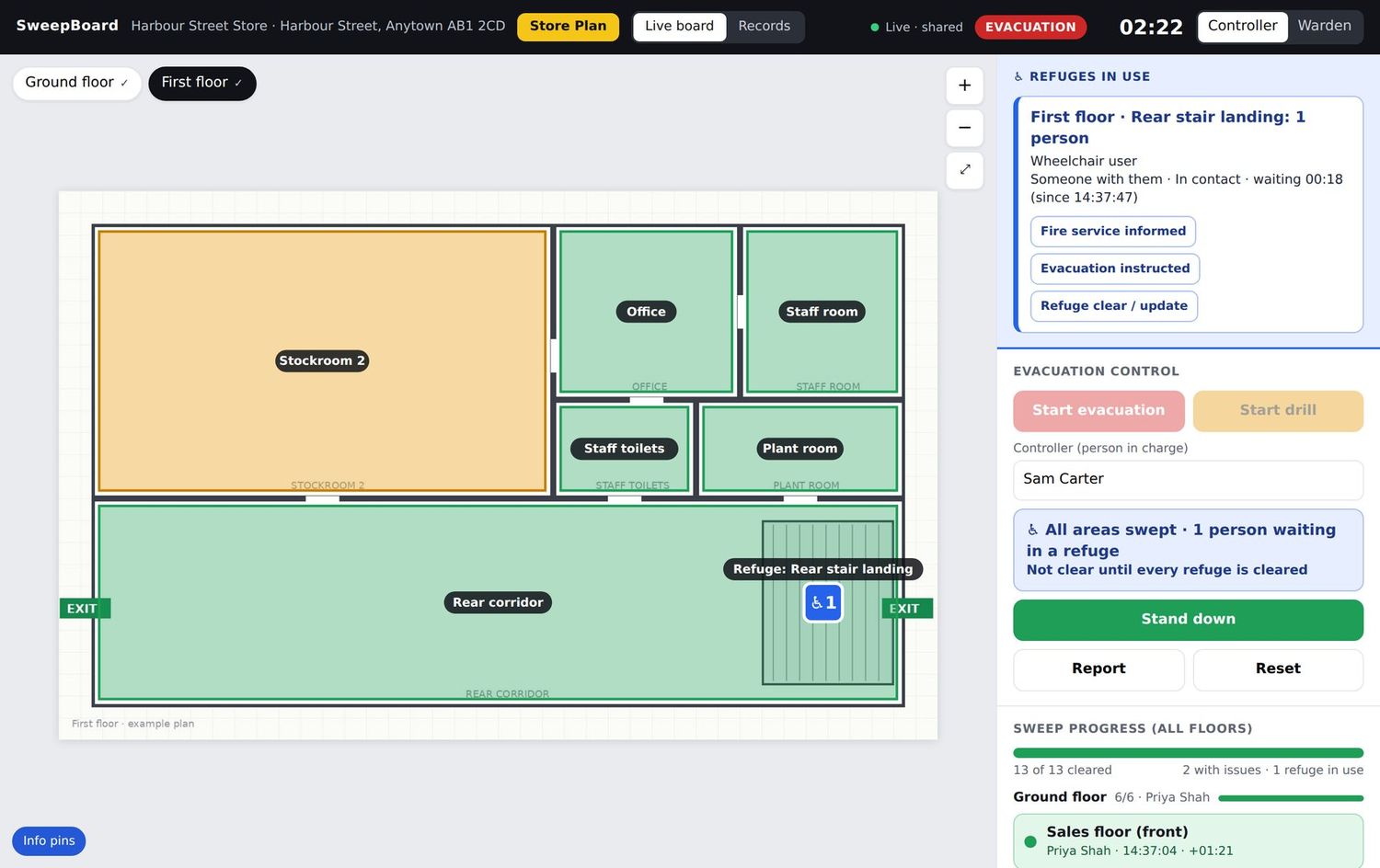
The board shows your real floor plans. Areas turn green when swept, orange when a warden reports an issue and red when they cannot get in. Nothing is left to memory.
- A live count of areas cleared on every floor
- Issues and no-access reports appear the moment they are logged
- Refuges in use are flagged with the number of people waiting
- QR ✓ shows which areas were proven visited
- Controller tasks, roll call and a one-tap fire service handover screen
- A running clock, and reset locked until stand down
One list. Big buttons. Nothing to learn.
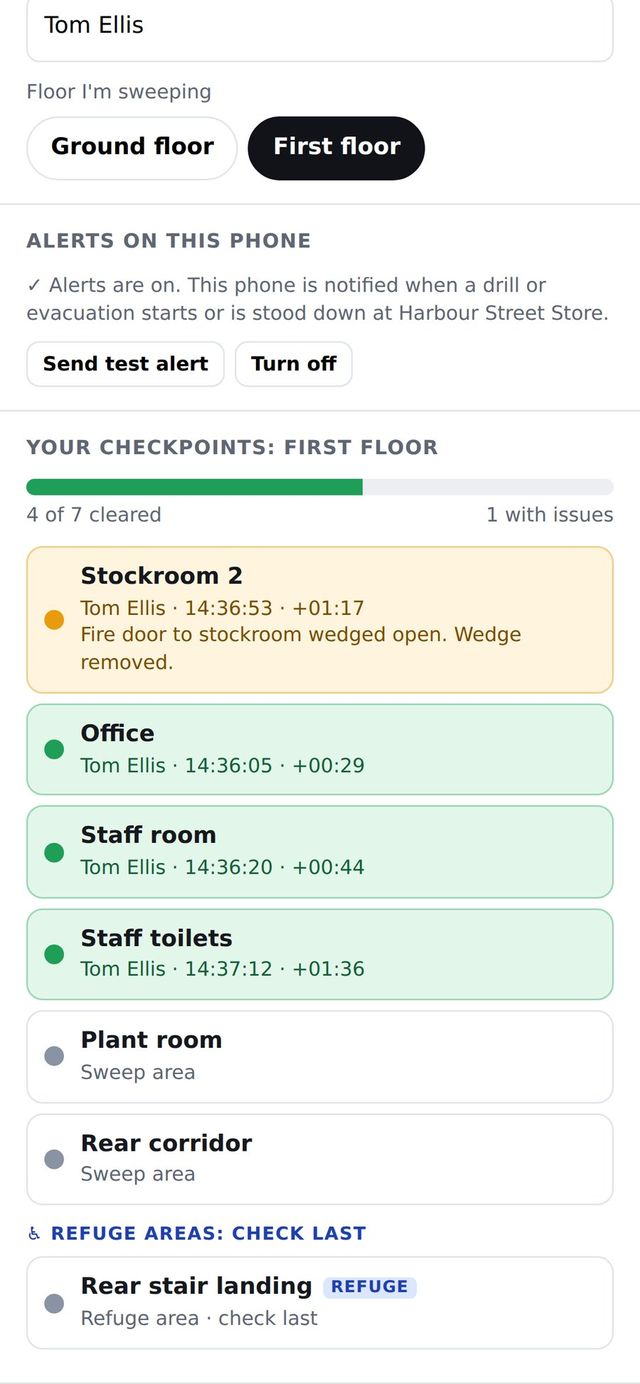
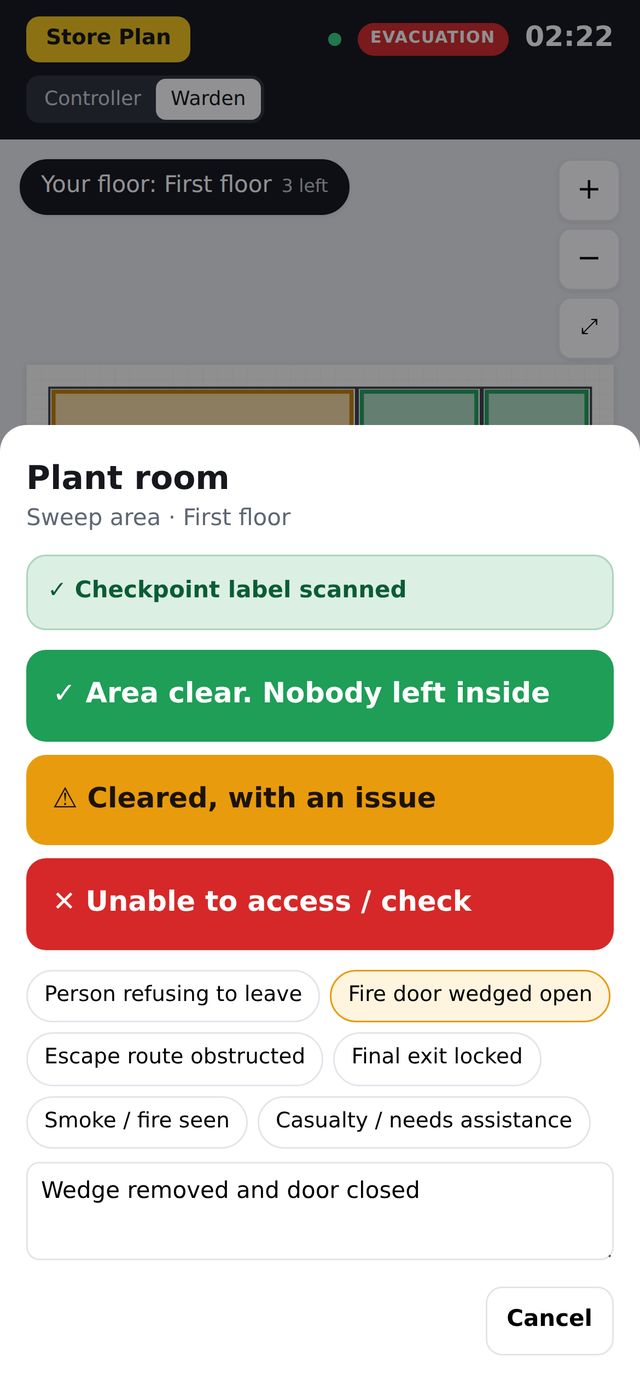
A warden scans the poster for their floor, enters the site code, types their name and sees their sweep list. Each area is one tap. It is designed for a person who is walking fast, under pressure, with an alarm sounding.
- No account, password or app store download: just the site code
- Clear, Issue and No access in one tap each
- Tasks such as closing a shutter, with Done or Couldn’t do it
- Optional QR labels to prove the warden reached refuges and key areas
- Refuge check is always the last item on every floor
- Keeps working with no signal and syncs when it returns
What you get with SweepBoard
Alerts to every warden
A push alert tells each warden which floor to sweep, with automatic reminders to anyone who has not opened it.
Find out moreRefuge areas tracked
Wardens report refuges empty or in use. The controller sees how many people are waiting and what help they need.
Find out moreReports that write themselves
Every tap is time-stamped. Stand down and the drill or incident report is saved, searchable and ready to print.
Find out moreEmergency plan in every pocket
Assembly points, alarm panel, isolation points, hazards and role action cards for the site, one tap away.
Find out moreFail-safe by design
Offline working, printable paper checklists and a clear fallback routine. The evacuation never depends on the app.
Find out moreYour data, kept separate
Every client has their own private database and web address, and every site its own access code. No names or medical details are held for refuge users.
Find out moreProof of presence
Optional QR checkpoint labels in the areas you choose, such as refuges. The record shows the warden was physically there.
Find out moreTasks, not just areas
Add actions such as isolating gas or meeting the fire service. Unfinished tasks hold the all clear.
Find out moreHead office view
Every site, every record and every overdue drill on one estate page, for the managers who need it.
Find out moreThe record your fire risk assessor, insurer and enforcing authority want to see
Fire safety law expects you to have evacuation procedures, enough trained people to carry them out and drills that test them. SweepBoard gives you the evidence that all three happened.
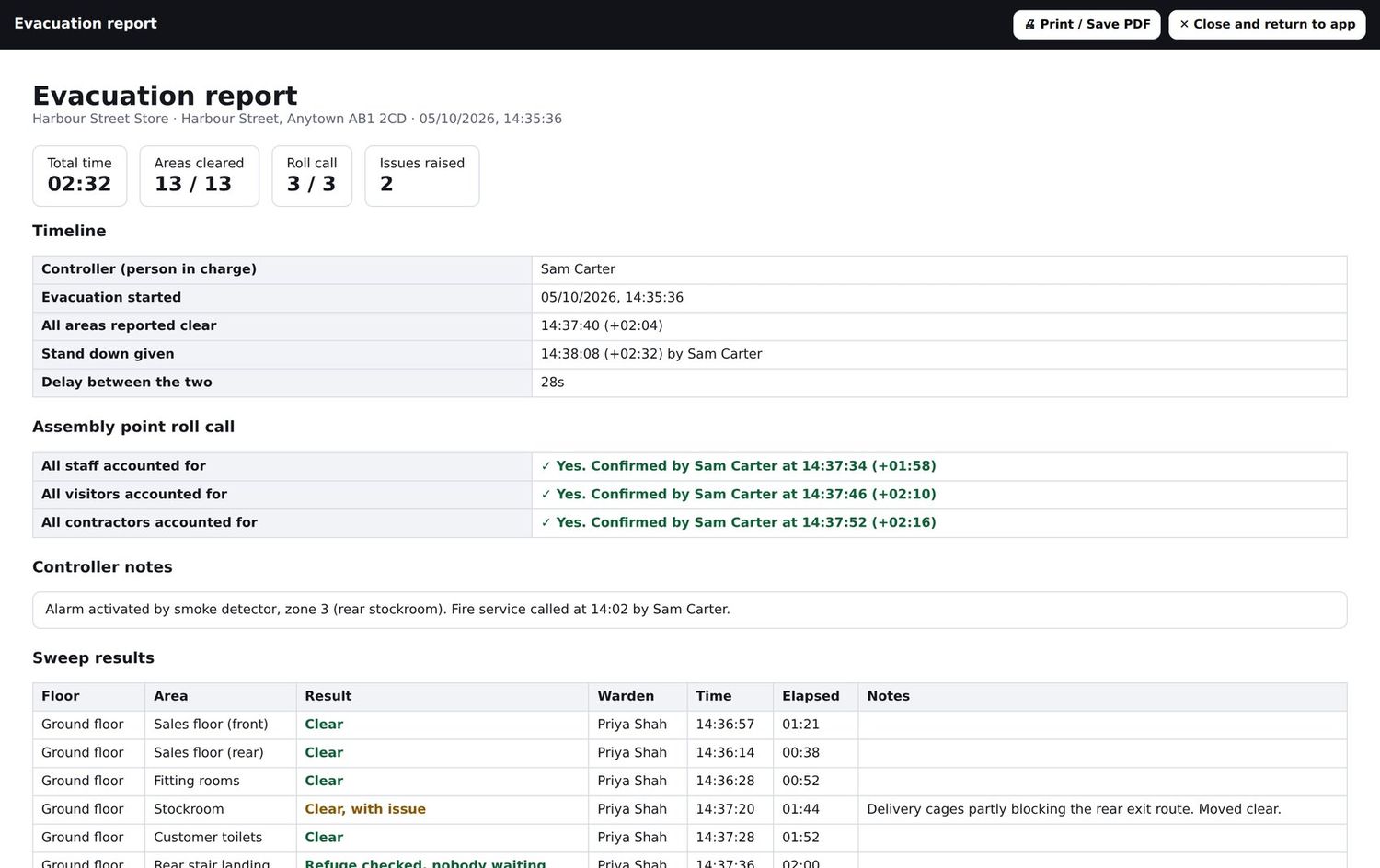
- Who swept which area, and at what time
- QR proof that refuges and key areas were physically visited
- How long the building took to clear, to the second
- Every issue found, in the warden’s own words
- Roll call confirmations, task outcomes and refuge outcomes
- A history of every drill and incident, with overdue sites flagged
Every site’s drills, on one page
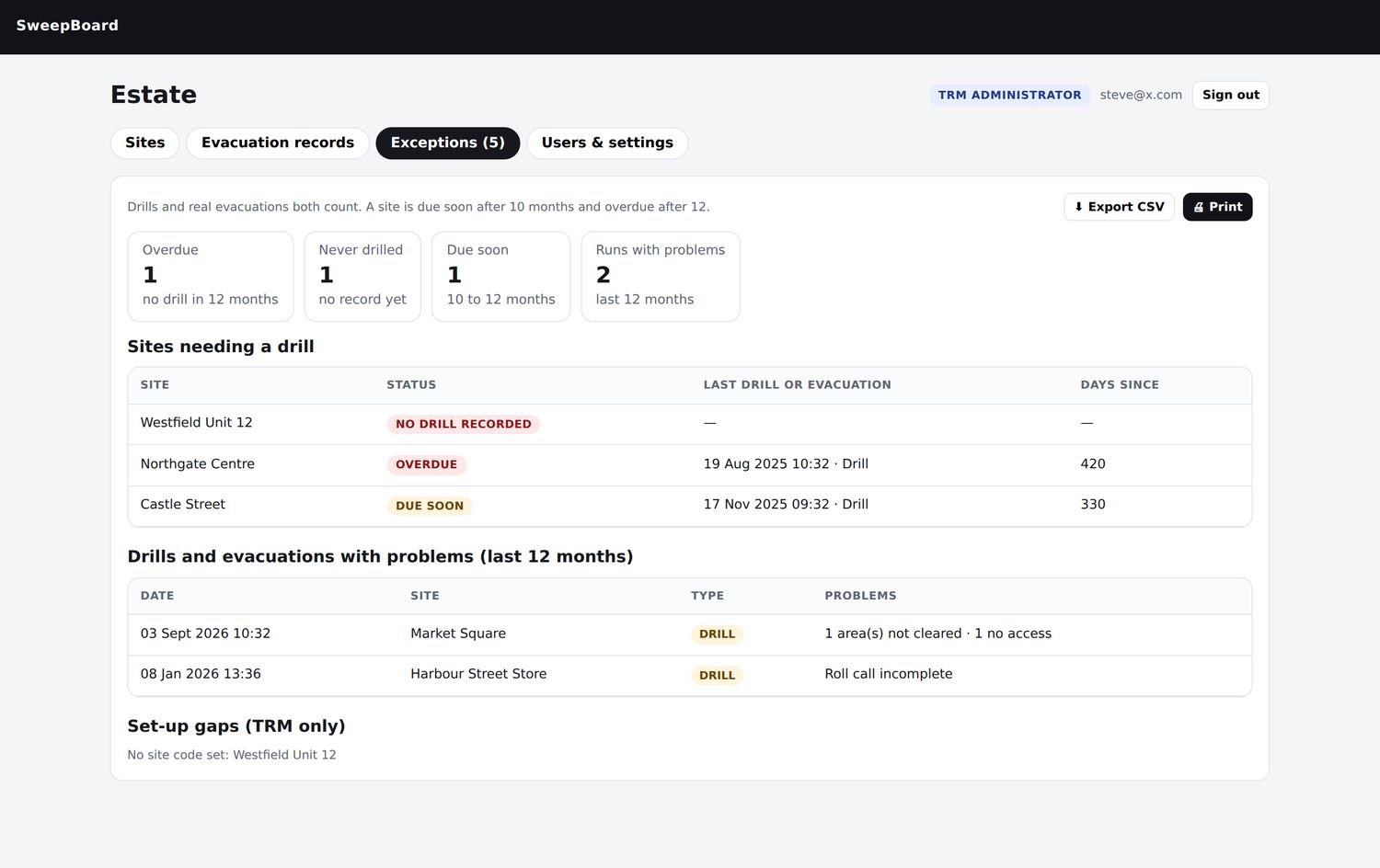
Managers sign in to an estate view: every site with its drill status, every evacuation record, and an exceptions list of what needs action.
- Sites shown in date, due soon or overdue
- Sites with no drill recorded at all
- Runs with problems: areas not cleared, tasks not done, refuges used
- Filter, export to CSV or print for audits and board reports
- View-only access: managers cannot change set-up or records
Any building where someone has to check it is empty
One site or several hundred. Each site has its own floor plans, sweep areas, refuges, site code, QR posters and history.
Designed by fire safety practitioners, not a software house
SweepBoard comes from the people who write fire risk assessments, train fire wardens and stand at assembly points watching drills. It does one job, and it is built around how an evacuation really runs.
See it run on your own floor plans
Book a 30-minute demo, or pilot SweepBoard on one site with a real drill. We set it up. You judge it on the result.